
Download SDGen Hair Designer – AI‑Powered Virtual Hairstyling Tool for Windows, Mac, iOS & Android
Intro: Why SDGen Hair Designer Is a Game‑Changer for Virtual Styling
Personal style has never been more fluid, and the tools we use to experiment with it must keep pace. SDGen Hair Designer answers that call by delivering a cloud‑based, AI‑driven studio that lets anyone—from hobbyists to professional stylists—visualise, tweak, and perfect hair looks without ever picking up a pair of scissors. The platform combines deep‑learning models trained on millions of hair images with a responsive web UI, so each change you make—whether it’s a subtle shade shift or a full‑blown neon makeover—is rendered in seconds with photorealistic shading, bounce, and reflection.
Because it lives in the browser, the software sidesteps the traditional “download‑install‑update” cycle; you simply log in, upload a photo or pick a base avatar, and start creating. Security is baked in: all data travels over HTTPS, is encrypted at rest on GDPR‑compliant servers, and is automatically purged after 30 days unless you save it to your personal library. Whether you’re a salon owner preparing client mock‑ups, a game developer needing batch hair assets, or a social‑media creator chasing the next trend, SDGen offers a free entry point with optional premium upgrades that unlock higher‑resolution exports, batch processing, and priority rendering queues.
In short, it’s the most accessible, secure, and future‑ready virtual hairstyling solution on the market today.
Features Overview: Core Capabilities That Set SDGen Apart
SDGen Hair Designer is more than a colour picker; it is a full‑featured creative engine built around AI‑enhanced realism. The system analyses facial geometry, hair strand direction, and ambient lighting to generate outputs that feel like high‑resolution photographs rather than flat illustrations. Below is a detailed breakdown of the most impactful features, each designed to streamline a specific stage of the styling workflow.
- AI‑Generated Style Suggestions: The engine proposes fresh hairstyles based on user‑selected attributes such as length, texture, and occasion, reducing the time spent browsing static libraries.
- Unlimited Colour Spectrum: From natural ash brown to electric turquoise, the colour wheel supports HEX, RGB, and CMYK inputs, with automatic shading adjustments that preserve depth.
- Hair‑Type Fidelity: Straight, wavy, curly, coily, and textured hair are modelled with physics‑based bounce, allowing realistic movement when the head is rotated.
- Accessory Library: Drag‑and‑drop crowns, hats, head‑bands, and futuristic helmets onto any design; each accessory automatically conforms to the underlying hair shape.
- De‑Noising & Upscaling: Low‑resolution uploads are cleaned using a proprietary neural filter, while a separate upscaling model can double the output resolution without artefacts.
- Batch Rendering Queue: Queue up to 50 avatars for automated processing—ideal for studios that need consistent hair assets across multiple characters.
- Multi‑Format Export: Export designs as PNG (lossless), SVG (vector), or layered PSD files, making it easy to integrate with Photoshop, Illustrator, or game engines.
- Collaboration & Commenting: Generate a secure shareable link that lets teammates leave timestamped comments directly on the canvas, streamlining feedback loops.
Every feature is continuously refined through user‑driven training data, meaning each software update introduces smarter hair physics, richer colour blending, and smoother UI interactions. This commitment to iterative improvement ensures that SDGen stays ahead of both consumer trends and professional demands.
Installation, Usage & Compatibility: Getting Started in Under Five Minutes
One of the biggest selling points of SDGen Hair Designer is its zero‑install, cross‑platform design. The entire application runs in modern browsers using WebGL and WebAssembly, so you only need a stable internet connection and a supported browser. Follow the steps below to launch the tool and start creating immediately.
Step‑by‑Step Setup (No Download Required)
- Navigate to sdgenhairdesigner.com and click the bright “Start Designing” button on the homepage.
- Create a free account using your email address or social login (Google, Apple, or Facebook). The registration process takes less than a minute.
- Accept the brief terms of service; all user data is encrypted in transit (TLS 1.3) and stored on EU‑based servers that comply with GDPR.
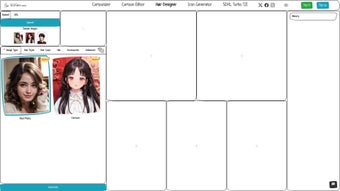
- Once logged in, you are taken to the main canvas where you can either upload a portrait or select a pre‑made avatar from the library.
Core Workflow Overview
- Upload or Choose a Model: Drag a high‑resolution photo onto the workspace or pick a default face. The AI automatically detects facial landmarks and aligns the hair layer.
- Select a Hairstyle: Browse the left‑hand style gallery; hover over any thumbnail to see a live preview before committing.
- Adjust Colour & Tone: Use the colour wheel, enter HEX values, or upload a palette image. The system recalculates shading in real time.
- Fine‑Tune Texture: Slider controls let you modify curl intensity, wave amplitude, or straightening levels for precise control.
- Add Accessories: Choose from the accessory tab, drag items onto the head, and rotate them for perfect alignment.
- Export or Share: Click “Export” to download PNG, SVG, or PSD files, or generate a secure shareable link for client review.
Compatibility Across Devices
Because the application lives in the cloud, it works on any device that runs a recent browser with WebGL support. Officially supported platforms include:
- Windows 10/11 (Chrome, Edge, Firefox, Safari)
- macOS Monterey or later (Chrome, Safari, Firefox)
- Linux distributions with up‑to‑date browsers (Chrome, Firefox)
- iOS 13+ (Safari or Chrome) and Android 9+ (Chrome)
There are no additional system requirements, making SDGen the perfect on‑the‑go solution for creators who need a reliable tool both at the studio and while travelling.
Pros, Cons & Frequently Asked Questions
Pros
- Instant web‑based access – no software download or installation.
- AI‑driven realism that adapts to a wide variety of hair textures.
- Comprehensive colour palette, including vibrant artistic shades.
- Rich accessory library adds a professional finishing touch.
- De‑noising and batch processing features are valuable for studios.
- Secure, GDPR‑compliant cloud storage protects user privacy.
- Free tier provides ample functionality; premium upgrades are optional.
Cons
- Requires a stable internet connection; offline work is not possible.
- Advanced batch‑rendering and high‑resolution export are locked behind paid plans.
- New users may need a short learning curve to master AI‑based controls.
- Export formats are limited to 2D files (PNG, SVG, PSD); native 3D support is absent.
Frequently Asked Questions
Is SDGen Hair Designer truly free to use?
Yes. The free tier lets you create, export, and share designs without cost. Premium subscriptions unlock higher‑resolution exports, batch rendering, and priority AI processing.
Can I use SDGen for commercial projects?
Absolutely. The license permits commercial use, especially when you are on a paid plan. Review the terms of service for any attribution requirements.
How secure is my uploaded photo?
All uploads travel over HTTPS and are stored encrypted on GDPR‑compliant servers. Files are automatically deleted after 30 days unless you save them to your personal library.
Does SDGen support 3D avatar integration?
Currently SDGen focuses on 2D rendering. Exported PNG or SVG files can be imported into 3D applications (e.g., Blender, Unity) as texture maps.
Which browsers deliver the best performance?
Google Chrome and Microsoft Edge provide the smoothest experience due to advanced WebGL support. Safari and Firefox work well, though some UI animations may be slightly slower.
SDGen Hair Designer bridges the gap between casual experimentation and professional styling pipelines. Its AI‑driven realism, extensive colour and accessory options, and cloud‑based convenience make it a standout choice for anyone looking to visualise hair transformations quickly and securely. While the reliance on an internet connection can be limiting for low‑bandwidth environments, the overall value—especially the generous free tier—far outweighs the drawbacks. For stylists, game artists, and trend‑setters alike, SDGen offers a future‑ready, secure, and highly adaptable platform.
Conclusion & Call to Action
When you need a reliable, AI‑powered tool that lets you experiment with hair without the risk of a permanent change, SDGen Hair Designer delivers on every promise. Its cloud‑first architecture ensures you can work from any device—Windows laptop, Mac desktop, iPad, or Android phone—while the robust feature set satisfies both casual users and professional studios. Start with the free plan to explore the full range of styles, colours, and accessories, then upgrade if you require high‑resolution exports or batch processing for larger projects. The combination of security, speed, and creative freedom makes SDGen a must‑have in any modern designer’s toolkit.
Ready to create your next signature look or build a library of hair assets for a game? Download SDGen Hair Designer now and experience AI‑driven styling that’s instant, secure, and completely customizable.



.png)



